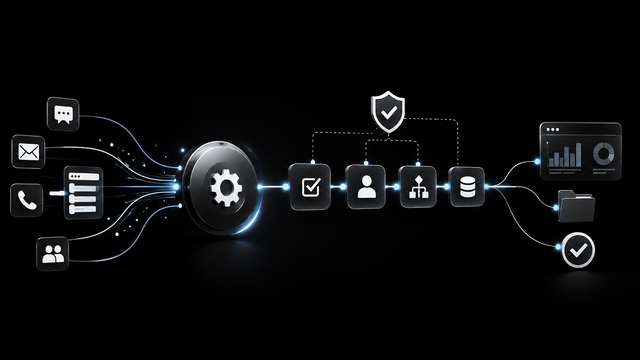
Customer support workflow automation is the use of AI, business rules, and connected systems to move support requests through intake, classification, context lookup, routing, approval, escalation, and resolution with less manual coordination. It is not the same as a chatbot. A chatbot can answer a customer question; a designed support workflow coordinates the operational work around that answer, updates the systems of record, and routes exceptions to the right person.
For service businesses, agencies, founders, and operations teams, the day-to-day problem is rarely that support staff have nothing to do. It is that messages arrive in different places, classification depends on who reads the inbox first, customer context lives in several tools, and urgent cases disappear in a busy queue. Customer support workflow automation for small teams should therefore remove manual triage, copy-paste work, missed handoffs, and inconsistent reporting without handing customer relationships to an unattended auto-responder.
This customer support workflow automation guide takes a process-first approach. It covers the triggers, intake, enrichment, AI decision logic, human approval, output, fallback path, reporting, and maintenance that make support automation useful. Platforms such as n8n, Make, and Zapier, along with CRMs, helpdesks, LLMs, and AI agents, can serve as components inside that workflow, but they are not the starting point.
Clarify the support process before choosing tools
Before you buy or build, define how support should work in plain rules. Most teams already have AI features inside a CRM or helpdesk, but those features are disconnected. Automating an unclear process moves mistakes faster. A useful customer support automation process starts with one repeatable, high-friction request type, clear ownership, and a known escalation route.
Map current intake channels
Support work usually enters through email, website forms, chat, helpdesk tickets, CRM activity, phone notes, and sometimes messaging channels. Document each channel, who currently monitors it, where duplicates appear, and which channel creates the most manual copying.
Define categories, priority levels, ownership, SLA logic, and escalation paths
Before automation, decide categories such as billing, onboarding, technical issue, account change, complaint, refund exception, legal, and unknown. Define priority rules based on customer tier, issue severity, or time sensitivity. Assign ownership by team or person. Set first-response and resolution expectations, and name the escalation path for billing, account security, legal, or compliance cases.
Choose one repeatable high-friction request type first
Do not automate all support at once. Start with one channel and one request type, such as billing questions or onboarding document requests. That gives cleaner training examples, simpler rules, and a faster way to measure whether the support workflow automation is helping.
The core workflow pattern for customer support automation
A reliable support workflow automation pattern has the same moving parts. Each step creates a decision or handoff instead of leaving work in an inbox.
Trigger and intake
A support request arrives from a monitored inbox, form, chat, helpdesk webhook, or CRM event. The workflow creates a case and captures the source, customer, timestamp, and original message.
AI classification and extraction
The AI step classifies the issue, extracts entities such as order number, account ID, document reference, or product name, and produces a short summary and handoff note. It should label low-confidence items as unknown.
Context lookup and policy checks
The workflow retrieves relevant context from the CRM, helpdesk, billing system, knowledge base, or database. It checks SLA rules, customer tier, contract terms, refund policy, and previous ticket history before proposing an action.
Approval, routing, or escalation decision
Based on the action risk and the AI classification, the workflow either creates a draft for human review, routes the ticket to an assigned queue, or escalates it to a named owner. Drafts are not sent without approval unless a narrow rule explicitly allows it.
Tool updates and customer response
After the human approves or the safe rule executes, the workflow updates the helpdesk, CRM, spreadsheet, database, or task board and sends the agreed response or status update.
Fallback path and named owner
If a lookup fails, a system is down, or the AI cannot classify with confidence, the workflow stops and routes the case to a named human with the reason visible. No ticket should fail silently.
Decision logic: what to automate, draft, route, or escalate
The question is not how much support can be automated. It is where judgment is required and where repetitive steps can be prepared for faster human decisions.
Safe starting points
Classification, summaries, handoff notes, draft replies, labels, follow-up reminders, and customer acknowledgement messages are good first steps because a person can review them before any customer-facing action.
Higher-risk actions
Refunds, compensation, account security changes, legal or compliance responses, medical or financial claims, and unusual promises should remain human-reviewed. The workflow can prepare the case but should not decide it without approval.
Unknown and low-confidence requests
When the AI cannot map a request to a known category or looks up conflicting policy information, the best output is escalation. Good customer support automation should not reward confident guessing. Routing to a human with a clear summary is a successful outcome.
Human approval, fallback handling, and governance
Human-in-the-loop support workflow design keeps automation useful. The approval gate, fallback path, and audit trail are what let a small team increase automation gradually. These best practices for customer support workflow automation keep the system controlled.
Approval gates based on action risk
Create approval gates that scale with risk. Low-risk actions like applying a label or creating a draft may run automatically; customer-facing sends or financial updates should require explicit approval. The gate should be part of the workflow, not an afterthought.
Fallback path when a tool, AI call, or lookup fails
Every automation step can fail: a CRM may not return a record, an email parser may produce an empty field, a model may time out. The workflow needs a defined fallback path with a named owner, a quiet alert, and a clear status so no ticket is lost.
Audit trail, least privilege, and escalation visibility
Keep an audit trail of what the workflow classified, changed, drafted, approved, and sent. Limit access to only the systems and actions the workflow needs. Make escalation visible to the right manager so unresolved cases do not hide.
Practical B2B examples of customer support workflow automation
The following customer support workflow automation examples show the same pattern in different support contexts. You can also view AI workflow automation examples to see how similar processes look in action.
Support ticket triage and routing for agencies or service businesses
Trigger: a client email arrives in a shared inbox or helpdesk. AI classifies the issue, extracts client name and request type, and retrieves the account record. Low-risk requests get a draft reply for a support owner to approve. Urgent or legal items route to the account lead. After approval, the helpdesk status updates and the reply is sent. If no account matches, the ticket routes to a named inbox owner.
Refund and billing exception review with CRM context
Trigger: a customer submits a billing or refund form. The workflow pulls the account status, plan, recent invoices, and any previous refund history. AI drafts a recommendation and applies the refund policy. Every refund above a simple rule goes to finance or support approval. After approval, the CRM and billing records update, and the customer receives a consistent explanation. If the CRM lookup fails, the case goes to a human with a partial record flagged for review.
Customer onboarding request processing and CRM updates
Trigger: a new customer sends a document or onboarding form. The workflow extracts the required fields, validates missing information, and retrieves the CRM account. A draft response requests missing documents or confirms next steps. Once approved, the CRM is updated, a task is created for implementation, and the account owner is notified. Any unclear submission goes to the onboarding queue for manual review.
Weekly support reporting and bottleneck detection
Trigger: a weekly schedule runs. The workflow pulls ticket volume, classification data, first-response times, escalation rate, unresolved cases, and edit rate. It summarises recurring issue types and bottlenecks into a short internal report for the support leader. A human reviews the report before it is shared with the wider team. This turns support data into a working operations review instead of a manual spreadsheet.
Measurement and reporting that make the workflow trustworthy
The goal is not a dashboard that looks busy. It is a short scorecard that tells the team whether support work is moving correctly.
Short scorecard
Track first-response time, drafts created, edit rate, escalation rate, unresolved cases, and classification accuracy. Keep the list short enough that a named owner reviews it weekly. If the scorecard is too long, it will not be used.
Weekly reporting cadence and named reporting owner
Assign one person to review the scorecard every week. That owner checks whether bottlenecks are process issues, staffing issues, or automation issues. Report the findings in one short internal update.
Using reporting to detect recurring issue types and process bottlenecks
Use clean categories to see which issues repeat most, which queue stalls, and where humans edit AI drafts most often. Those patterns reveal which rules need tightening, which knowledge base content is missing, and which workflow steps should be simplified.
Implementation sequence for small teams
- Pick one channel and one repeatable support request type.
- Review at least 20 real conversations before increasing autonomy. Look for edge cases and failure patterns.
- Write rules, approval boundaries, and escalation conditions before building anything.
- Connect existing tools without requiring migration. Work with the inbox, CRM, helpdesk, spreadsheet, or database already in use.
- Test, launch with human review, and measure weekly before expanding to another request type.
Failure modes and maintenance in support workflow automation
Automating unclear process rules just moves mistakes faster
If intake is inconsistent, ownership is unclear, or escalation depends on individual judgment, a new support workflow will not fix the underlying problem. The process rules need to be written first.
Silent failures, brittle routing, and system changes over time
Workflows can fail quietly when an integration changes, a field moves, or a system becomes unavailable. Routing that works on day one can become brittle as teams add channels and edge cases. A named owner and a weekly review catch these before they become silent queue failures.
AI confidence issues, policy confusion, and hallucinated responses
A model can produce a confident-looking answer that conflicts with policy or invents a reason for a blocked action. That is why approval gates, policy checks, and fallback routes matter. The workflow should treat low-confidence or conflicting information as a signal to escalate.
Maintenance schedule, documentation, training, and ongoing improvement
Customer support workflow automation is not a launch-and-forget project. Keep documentation current, train new team members, review the rule set, and improve the workflow from real ticket patterns. This is how a small team keeps support automation trustworthy over time.
How Acxiomflow turns scattered support tools into one working process
Acxiomflow helps service businesses, agencies, founders, and operations teams move from scattered tools to one working process. It works with the tools you already pay for and requires no software migration. The goal is not to replace your team or your software, but to remove the repetitive work that slows support down.
Acxiomflow provides AI workflow automation services that connect support intake, AI understanding, process rules, tool updates, and team approval into one measurable workflow. The Acxiomflow process follows audit, design, build, deploy, train, maintain, and improve, so a support workflow is not left to fail silently after launch.
Frequently asked questions
For broader automation questions, see the AI workflow automation FAQs. The answers below focus on customer support workflow automation.
What is customer support workflow automation?
Customer support workflow automation is the use of AI and operational logic to move support work through intake, classification, routing, approval, escalation, and resolution steps with less manual queue management. It is not just auto-replies. It also coordinates routing, actions, follow-up tasks, and reporting.
How is customer support workflow automation different from a chatbot?
A chatbot may answer questions. Customer support workflow automation coordinates the operational steps around support work, including routing, actions, escalations, follow-up tasks, and reporting.
What support tasks should stay human-reviewed?
Refund exceptions, angry customers, legal threats, financial or medical claims, account security issues, unusual promises, and low-confidence AI decisions should remain human-reviewed.
What should a small team automate first?
Start with classification, summaries, handoff notes, draft replies, labels, and routing. These tasks save time and reduce missed context with less risk than fully automated customer replies.
What should buyers test before committing to customer support workflow automation?
Test real workflows such as triage, priority routing, exception handling, human handoff, and post-resolution follow-up. That reveals whether the system handles support operations, not just response generation.
Conclusion and next step
Customer support workflow automation is most valuable when it is a designed process, not another tool. Small teams should start with one channel, one request type, clear rules, human approval, and a short weekly scorecard. That creates a support workflow your team can understand, trust, and improve.