Quick answer: Accounting workflow automation means connecting the tools your firm already uses—QuickBooks, Xero, email, CRM, and document systems—into a single process where AI helps classify, extract, and route work, while your team reviews and approves every critical step. Instead of buying yet another platform, the goal is to design a workflow that moves financial data from intake to reporting with clear measurement and error handling.
What Accounting Workflow Automation Actually Means (Beyond Software)
Most articles about accounting workflow automation start with a list of software. They miss the point. The real transformation is not buying a new tool—it’s designing a connected sequence of stages that turns scattered actions into one working process.
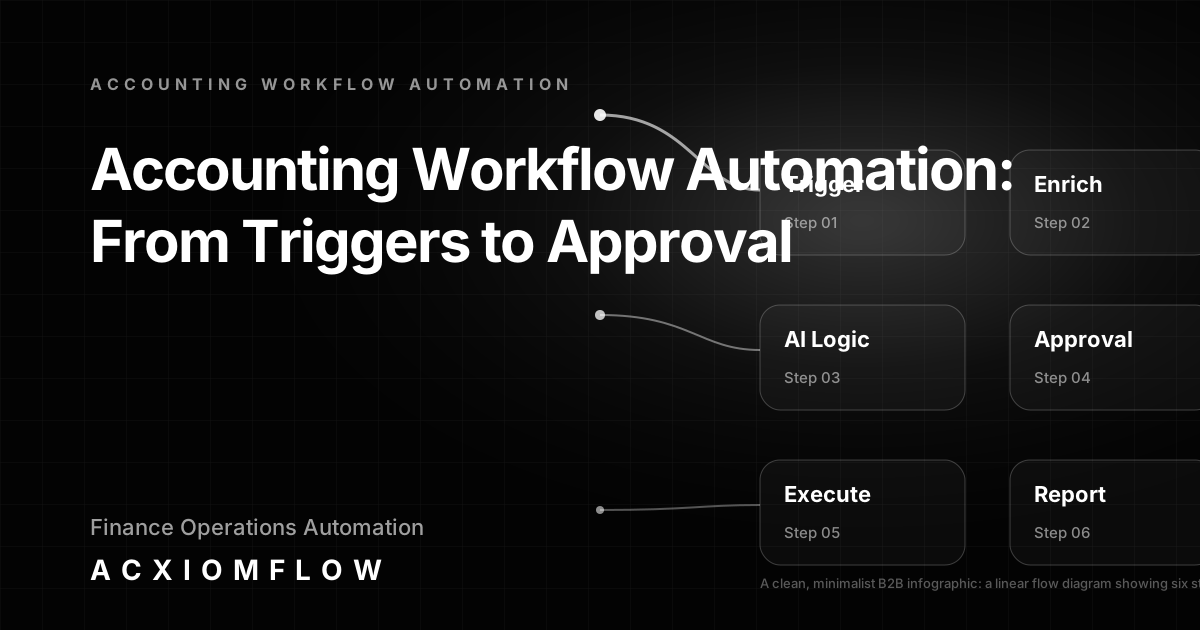
Think of it as a flow: a trigger starts the work (a client email, a new form submission, a CRM status change), AI understands the content (classifying documents, extracting data, suggesting categories), process rules route and validate the information, the relevant accounting tool gets updated (QuickBooks, Xero, or a spreadsheet), a human reviews and approves, and finally the results are measured and reported. Every step is intentional, and every sensitive financial decision stays under human control.
The six stages of a well-designed accounting workflow
- Trigger: Email, uploaded document, CRM record, webhook, or calendar event that starts the workflow.
- AI understanding: Classify, extract, summarise, and suggest next actions—without overwriting source data.
- Process rules: Define who does what, priority levels, compliance checks, and routing paths.
- Tool updates: Write structured data into QuickBooks, Xero, HubSpot, Airtable, or a reporting database.
- Human approval: Accountants review exceptions, confirm AI suggestions, and authorise sensitive actions.
- Reporting: Track cycle times, error rates, and exceptions to continuously improve the process.
Why most firms stay stuck with tool silos
Accounting firms often run five or more systems: practice management, document management, CRM, email, and accounting software. Each holds part of the workflow, but nothing connects them. Client intake forms sit in email or a portal, tax document requests go out manually, reconciliation means checking entries across two screens, and reporting takes hours of copy-paste work. Teams end up as the human glue between tools, performing the same repetitive steps every month.
This is not a software shortage problem—it’s a process design problem. The work is scattered across tools, not flowing through them.
Acxiomflow’s core promise: from scattered tools to one working process
Acxiomflow focuses on turning that collection of disconnected tools and AI features into one measurable working process. No software migration. No rip-and-replace. Instead, we map your highest-friction tasks, design the full workflow with human approval built in, and connect the existing stack so that work moves automatically from intake to reporting—with your team in control at every stage.
Core Elements of an AI-Driven Accounting Workflow
AI is not the workflow; it is the decision-support layer that makes the workflow practical. Every well-designed accounting workflow includes seven elements. Skip any one, and the process either breaks or creates more manual work.
Trigger: where the work starts
The trigger must be reliable and structured. Common accounting triggers include: - Client submits an intake form or a document through a portal. - A supplier email arrives with an invoice attachment. - A CRM opportunity moves to “closed won,” signalling the need for a proposal or engagement letter. - A calendar date triggers a tax deadline reminder sequence.
AI understanding: classification, extraction, and categorisation
Once triggered, AI reads the unstructured content: it classifies a document as an invoice, a receipt, or a tax form, extracts key fields (date, amount, vendor, tax ID), and suggests a general ledger category or next action. The AI does not make the final decision—it prepares the information so a human can review it quickly.
Process rules: routing, validation, and priority
Rules determine what happens next. For example, an invoice over a certain amount might be routed to a senior accountant; a tax document flagged as incomplete might trigger a client reminder; a reconciliation match above a threshold might skip straight to ledger update but still log for review. These rules live inside the workflow, not inside any single application.
Tool updates: where the data lands
After AI and rules, the structured data must be written into the firm’s systems: update QuickBooks or Xero with a new transaction, create a task in the practice management tool, log the interaction in the CRM, or populate a spreadsheet for month-end reporting. The workflow’s job is to write once, update everywhere, keeping a single source of truth.
Human approval and exception handling
Every critical financial step requires a human to review and confirm. The workflow presents the AI’s suggestion alongside the original document and any supporting data. The accountant approves, adjusts, or rejects. This human-in-the-loop approach ensures accuracy, maintains compliance, and builds trust in the automated process.
Fallback path and error monitoring
If the AI cannot extract data reliably, or a step fails because a system is temporarily unavailable, the workflow must have a fallback: route to a human operator with a clear alert, log the error, and pause the process until someone resolves it. Without this, automation becomes a black box that fails silently.
Reporting and measurable improvement
Every workflow should produce metrics: how many documents processed, average handling time, approval rates, and exceptions. This data allows firms to see exactly where the bottleneck moved and where to refine rules, retrain models, or adjust resources.
Practical B2B Workflow Examples for Accounting Firms
These examples show the full chain—trigger, AI logic, rules, tool updates, human approval, and reporting—using the tools your firm already has. They are not tool-specific templates; they are process architectures.
Client intake and document request automation
Trigger: A potential client submits an online form with company details and required services. AI understanding: AI extracts firm name, UTR, and contact points, classifies the service type, and drafts a personalised acknowledgment email. Process rules: The request is routed to the appropriate partner based on service area; a checklist of required documents is generated. Tool updates: A new record is created in the CRM (HubSpot or Pipedrive) with client details and a document request task created in the practice management system. Human approval: The assigned accountant reviews the AI-drafted email, adjusts tone, and sends it. They confirm the document checklist before it goes to the client. Reporting: Time from form submission to first response is tracked alongside document submission rates.
Invoice and expense categorisation with human-in-the-loop
Trigger: A supplier invoice arrives by email or is uploaded to a document portal. AI understanding: AI reads the invoice, extracts supplier name, date, amount, VAT, and line items, then suggests a coding (e.g., “Office Expenses”). Process rules: High-value invoices are flagged for senior review; recurring suppliers are matched against historical coding. Tool updates: The coding suggestion is pushed to QuickBooks Online as a draft bill. Human approval: An accountant reviews the suggestion, corrects if needed, and confirms the posting. Reporting: Number of invoices processed per week, average time from receipt to posting, and correction rates tracked.
Reconciliation support workflow
Trigger: Daily bank feed import into the accounting system. AI understanding: AI matches transactions against open invoices, purchase orders, and known payees, suggesting matches and flagging exceptions. Process rules: High-confidence matches (exact amounts, known vendors) are posted automatically as draft reconciliations; low-confidence matches and multi-line transactions are held for review. Tool updates: Matched transactions are posted as drafts in Xero. Human approval: An accountant reviews the flagged items, confirms or overrides suggestions, and finalises the reconciliation. Reporting: Reconciled items per day, exception rate, and average resolution time.
Deadline and reminder automation
Trigger: Calendar event for a tax deadline or compliance date. AI understanding: AI drafts a reminder email with relevant client-specific details and deadlines. Process rules: If a client has not submitted required documents 10 days prior, send a reminder; escalate to a phone call task after 7 days. Tool updates: Email draft is created in Outlook or Gmail; tasks are added in the practice management tool. Human approval: Accountant reviews and sends the email. Reporting: Reminder effectiveness (submission rates before deadline), time saved per client cycle.
Proposal generation and approval flow
Trigger: CRM deal stage moves to “Proposal Requested.” AI understanding: AI pulls engagement terms from a library, inserts client-specific data, and drafts a proposal document with scope and pricing. Process rules: Proposals over a fee threshold require partner approval. Tool updates: Proposal document created in Google Docs or Word, logged in CRM. Human approval: Account manager reviews and edits the proposal before sending to the client. Reporting: Proposal turnaround time, win rate correlation.
Internal reporting workflow
Trigger: Scheduled time (e.g., Monday 9:00 AM). AI understanding: AI pulls data from QuickBooks and Xero (outstanding invoices, WIP, cash position), CRM (pipeline), and practice management (staff utilisation), then drafts a summary report. Process rules: Distribute to partners and department heads. Tool updates: Report saved in shared drive; email sent. Human approval: Finance manager reviews and adds commentary before distribution. Reporting: Report preparation time reduced from 4 hours to under 30 minutes.
For more real-world examples, see AI workflow automation examples.
Building the Process, Not Just Buying a Tool
The SERP is full of articles titled “14 Best Accounting Workflow Management Software” or “Top AI Tools for Accountants.” They treat the tool as the solution, not the process. But as we’ve seen, the workflow doesn’t live in any one app—it lives across them.
The trap of tool-only thinking
Buying a new platform often adds another silo. Firms end up with a practice management tool, a document management tool, a CRM, and accounting software, none of which talk to each other without manual data transfers. The result is a collection of task lists and reminders, not a connected flow.
How Acxiomflow approaches tool-agnostic workflow design
We design from the process outward: first the intake, then AI logic, then rules, then output to whatever tools you use, then approval, and finally reporting. The automation sits on top of your existing stack. Platforms like n8n, Make, and Zapier can serve as the connective tissue, but the real value is in the process architecture, not the platform. AI agents and LLMs support decision-making, but humans remain the final authority.
Where tools fit in (and where they don’t)
Every accounting firm has a unique mix of QuickBooks, Xero, HubSpot, Pipedrive, Google Workspace, Microsoft 365, and specialist tax applications. The workflow’s job is to treat these as components: trigger from one, enrich with AI, write to another. No single app owns the process; the workflow orchestrates them all.
From Scattered Tools to One Working Process: Acxiomflow’s Approach
Acxiomflow moves firms from scattered tools to one measurable business process through a practical, human-led delivery method.
Workflow audit: identifying your highest-friction task
We start by looking at where your team spends the most repetitive effort. This might be manual data entry from client forms, chasing missing documents, or reconciling entries across two systems. The audit pinpoints the process with the clearest return on investment.
Process design workshop: mapping the entire chain
Together, we map the ideal process: trigger, AI understanding (what to classify, extract, or draft), rules (routing, validation, priority), tool updates (where data is written), approval steps (who reviews, when), and fallback paths. The workshop produces a blueprint, not a shopping list of new software.
Build and test: connecting your existing stack without migration
Our team builds the workflow using your current tools and appropriate automation platforms. We test with real data, refining rules and approval gates until the process runs smoothly. You never need to replace QuickBooks, Xero, or your CRM; we connect them. Learn more about our Acxiomflow process.
Human approval and governance
Every sensitive financial step has a human-in-the-loop check. We configure dashboards where your team sees pending approvals, AI suggestions, and source documents side by side. This keeps you in control while eliminating repetitive admin.
Training, documentation, and handover
You get clear documentation and live walkthroughs so your team can operate, troubleshoot, and improve the workflow independently. We don’t lock you into a black box.
Ongoing maintenance and measurable reporting
We set up performance tracking so you can see time saved, errors reduced, and bottlenecks shifted. Monthly reviews help refine rules and AI models as your firm grows.
For firms ready to implement, our AI workflow automation services cover the full lifecycle.
Common Pitfalls to Avoid When Automating Accounting Workflows
Even the best automation projects can fail if these mistakes are made.
Automating broken processes
If your current manual process is chaotic, automating it just makes chaos faster. Map and optimise the process first.
Ignoring data quality and standardisation
AI relies on consistent input. Standardise how documents are named, forms are structured, and data is entered before triggering automation.
Skipping the human-in-the-loop for sensitive financial decisions
Never allow AI to post transactions, file taxes, or send client-facing communications without review. Human approval is not a bottleneck; it’s a control.
Forgetting fallback and error handling
If a bank feed fails or a document can’t be read, the workflow must alert a human with clear context, not fail silently.
Choosing a tool before designing the process
The tool should follow the process, not define it. Start with the audit and design, then select the right automation platform.
Frequently Asked Questions About Accounting Workflow Automation
For more questions, visit our AI workflow automation FAQs.
How to automate an accounting process?
Start by mapping the process, not picking a tool. Identify the trigger (e.g., client uploads a receipt), apply AI to extract and classify data, set routing and validation rules, push the output to your accounting platform (QuickBooks or Xero), and include a human review step before final posting. Good automation also builds in fallback paths and tracks performance, not just moves data.
What is a workflow for accounting?
A workflow is a connected sequence of tasks that moves financial data through intake, understanding, processing, recording, approval, and reporting. For example, a monthly invoice reconciliation workflow might begin with an email attachment, use AI to read the invoice, match it against the purchase order, prompt an accountant to confirm the match, and then update the ledger. The workflow is the full path, not any single piece of software.
How is automation being used in accounting?
Automation is used in practical, end-to-end processes with human oversight: automatic expense categorisation from scanned receipts, client reminders for tax deadlines, bank feed reconciliation with suggested matches for review, proposal drafting triggered by CRM changes, and weekly management report generation. In every case, the automation handles the repetitive part, while the accountant reviews and approves.
What is the best accounting workflow management software?
There is no single 'best' software. The right choice depends on the process you design and the tools your firm already uses. Value comes from how the workflow connects triggers, AI logic, human approval, and outputs across platforms like QuickBooks, Xero, and your CRM—not from a standalone workflow app. Starting with a workflow audit is far more effective than choosing a tool first.
What are the first steps to automate an accounting firm's workflow?
Begin with a workflow audit: identify the highest-volume, most manual task (e.g., client data entry from forms), map the current scattered tool stack, define the desired end-to-end process with clear approval points, and then build a pilot that connects your existing tools before evaluating any new software. A free AI workflow audit from Acxiomflow is a practical first step.
Getting Started: Book a Free AI Workflow Audit
The quickest way to turn scattered tools into one working process is to start with an audit. In a focused session, we review your highest-friction accounting task, map a practical workflow that keeps your team in control, and identify where AI can reduce repetitive admin without sacrificing oversight.
You’ll leave with a clear blueprint—not a sales pitch—and an understanding of the time and quality improvements possible before writing any code or buying new software.